Basic 6 · Computing · Introduction to MS Windows Interface
Using the File Explorer Window
In this topic you will use File Explorer to view, sort, copy, move and search for files and folders.
By the end of these notes you should be able to:
- Change the view of files in File Explorer
- Sort files by name, date, type and size
- Copy, move and search for files
What you already know
- File Explorer basics (Basic 5)
Copy everything that has a blue line on its left into your notebook. The other parts are for reading.
- Strand
- Introduction To Computers
- Sub-strand
- Introduction to MS Windows Interface
- Indicator
- B6.1.2.1.4-6 – Illustrate the use of the File Explorer window
Introduction
A school office stores reports, letters and photos. Without organisation, finding one file could take hours. File Explorer gives you tools to view, sort and search.
1. Changing the View
| View | What you see | Best for |
|---|---|---|
| extra large / large icons | big pictures of files | photos |
| list | names in a list | many files |
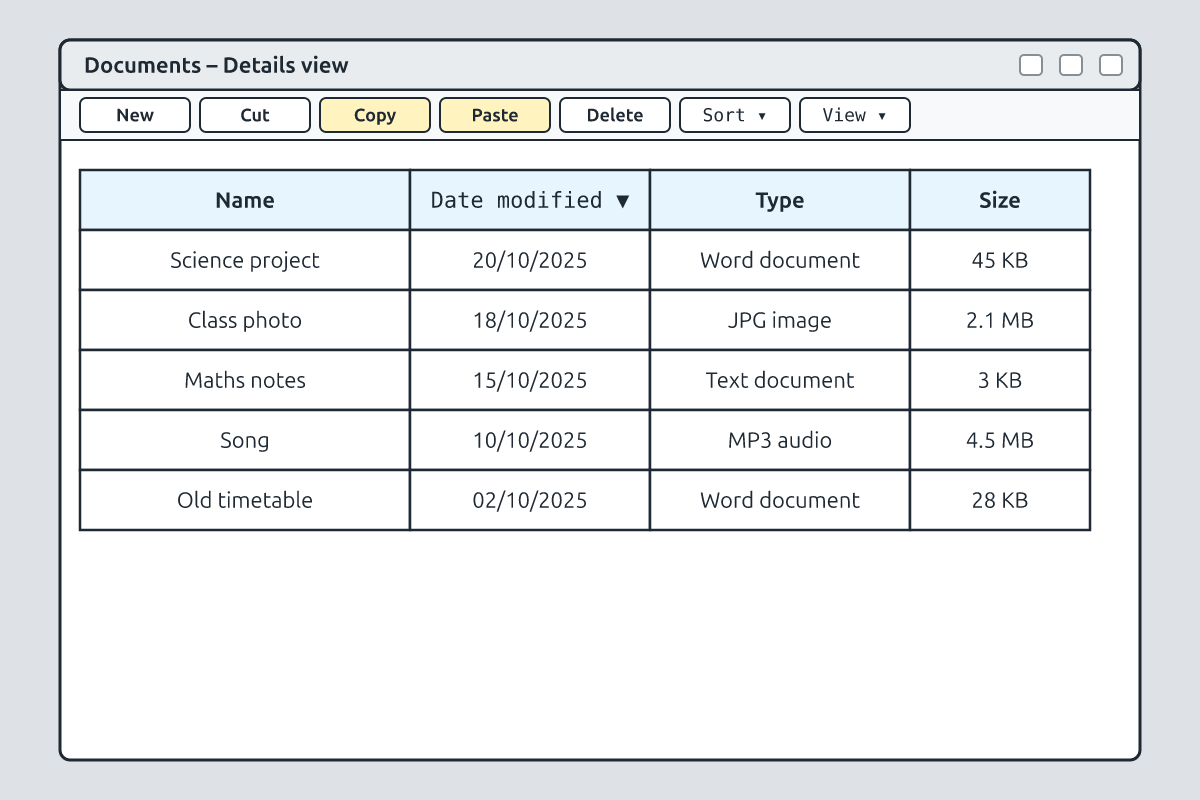
| details | name, date modified, type and size in columns | comparing files |
| tiles | icons with file information | general use |
Click the View menu (or the View button on the toolbar) and choose a view.
2. Sorting Files
In Details view, click a column heading such as Name, Date modified, Type or Size to sort the files. Click again to reverse the order (A–Z or Z–A, newest or oldest). You can also right-click an empty space → Sort by.
3. Copying and Moving
| Action | Result | How |
|---|---|---|
| copy | file stays in the original place and a duplicate goes to the new place | Ctrl + C, then Ctrl + V in the new folder |
| move (cut) | file leaves the original place and goes to the new place | Ctrl + X, then Ctrl + V |
| drag (same drive) | moves the file | drag to the new folder |
| drag (different drive, e.g. USB) | copies the file | drag to the drive |
4. Searching for Files
Type part of a file name in the search box at the top right of File Explorer. Windows shows matching files in the current folder and its subfolders. You can search by type, for example typing ".docx" to find Word documents.
5. Renaming and File Names
Right-click a file → Rename, or select it and press F2. Use clear names such as "Science_Report_Week4". File names cannot contain these characters: \ / : * ? " < > |
New words
- view
- The way files are displayed.
- sort
- To arrange in order.
- copy
- To duplicate a file.
- move
- To change a file's location.
- search box
- The box for finding files by name.
- file extension
- Letters after the dot showing file type, e.g. .docx.
Summary
- Change views to see files as icons, lists or details.
- Sort by clicking column headings.
- Copy keeps the original; move (cut) relocates it.
- Use the search box and clear file names to find files quickly.
Class activity: File Organiser
- Create a folder "My Work" with three files inside.
- Sort the files by name and by date.
- Copy one file to a new folder and move another, then search for the third.
You need: Desktop computer, Mouse, Keyboard
Exercises
Answer in your exercise book first, then check your answers.
1. Which view shows date and size in columns?
- A. Details
- B. Large icons
- C. Tiles
- D. Slideshow
Show answer
Answer: DetailsIt shows columns.2. Ctrl + X followed by Ctrl + V…
- A. moves a file
- B. copies a file
- C. deletes a file
- D. renames a file
Show answer
Answer: moves a fileCut and paste.3. Which key renames a selected file?
- A. F2
- B. F5
- C. Esc
- D. Tab
Show answer
Answer: F2Quick rename.4. Copying leaves the original file in place.
- A. True
- B. False
Show answer
Answer: TrueA duplicate is made.5. A file name can contain a question mark.
- A. True
- B. False
Show answer
Answer: False? is not allowed.6. The letters after the dot, such as .docx, are the file ______.
Show answer
Answer: extensionShows type.7. Explain the difference between copy and move.
Show answer
Answer: Copy makes a duplicate and keeps the original; move takes the file away from its original place.Two actions.8. How would you find all the Word documents in a folder?
Show answer
Answer: Type .docx in the search box (or sort by Type in Details view).Search or sort.
Homework
- Write the steps for copying a file from Documents to a flash drive.