Basic 6 · Computing · Data, Sources and Usage
Sending and Sharing Information
In this topic you will demonstrate how to send and share information using SMS, email, messaging apps and file sharing, safely and politely.
By the end of these notes you should be able to:
- Describe ways of sending and sharing information
- Explain the parts of an email
- Share information safely and politely
What you already know
- Manipulating data
Copy everything that has a blue line on its left into your notebook. The other parts are for reading.
- Strand
- Introduction To Computers
- Sub-strand
- Data, Sources and Usage
- Indicator
- B6.1.3.1.7 – Demonstrate sending and sharing information
Introduction
In seconds, a farmer in Techiman can send a photo of a sick crop to an expert in Accra. Technology allows information to travel quickly across the country and the world.
1. Ways of Sending and Sharing Information
| Method | Description | Example use |
|---|---|---|
| SMS | short text messages between phones | reminders, mobile money alerts |
| voice call | speaking over the phone | urgent news |
| electronic letters with attachments sent over the internet | sending a school report | |
| messaging apps | chat, voice notes, photos and videos over the internet | class group chats |
| Bluetooth | short-range wireless sharing between nearby devices | sharing a photo with a friend |
| cloud storage | saving files online and sharing a link | Google Drive, OneDrive |
| USB flash drive | copying files to a portable drive | moving work between computers |
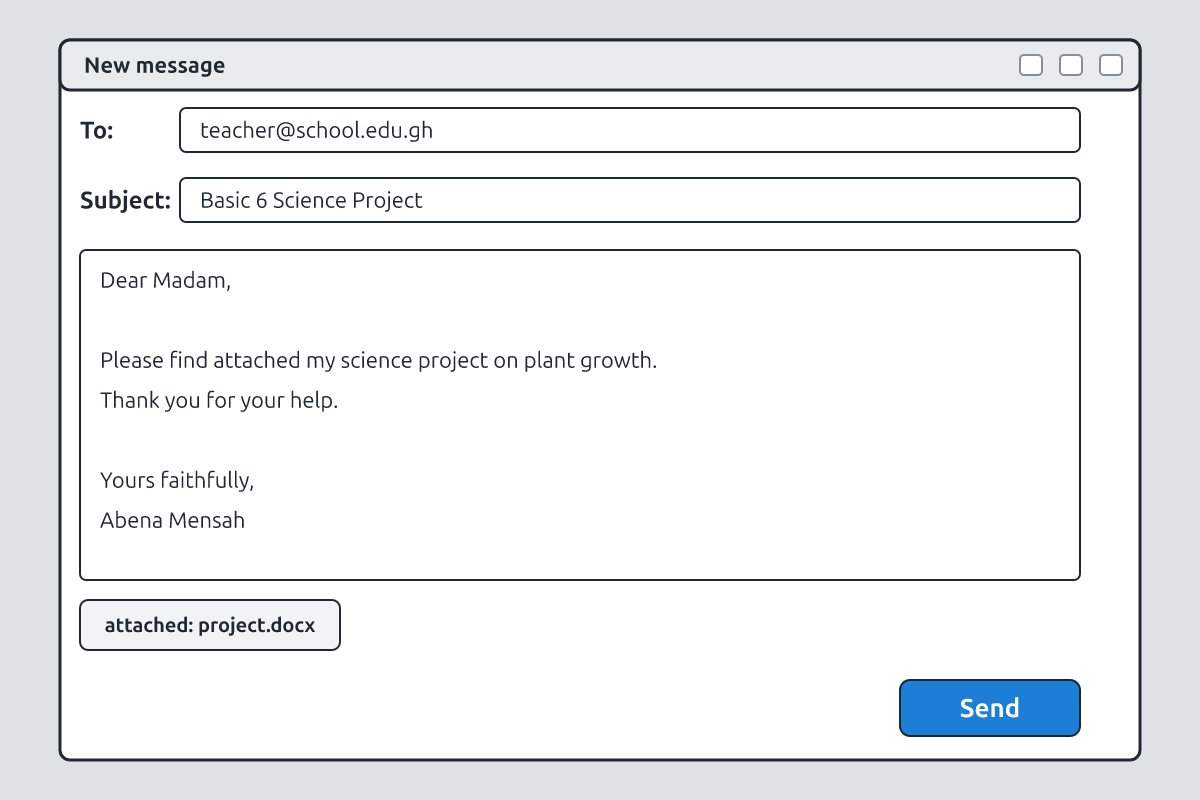
2. Parts of an Email
| Part | Purpose | Example |
|---|---|---|
| To | the receiver's email address | [email protected] |
| Cc | a copy to another person | [email protected] |
| Subject | short title of the message | Basic 6 Science Project |
| Body | the message itself | "Dear Madam, please find attached…" |
| Attachment | a file sent with the email | project.docx |
| Send button | sends the email |
3. Netiquette (Polite Online Communication)
- Write a clear subject and greet the receiver politely.
- Use correct spelling and punctuation; avoid writing in ALL CAPITALS (it looks like shouting).
- Keep messages short and to the point.
- Do not forward chain messages or rumours.
- Check the receiver's address before sending.
4. Sharing Safely
Never share your passwords, PINs, home address or personal photos with strangers. Be careful with links and attachments from people you do not know; they may contain viruses or scams. Ask permission before sharing someone else's photo. Remember that once information is shared online, it can be copied and is difficult to remove.
New words
- Electronic mail sent over the internet.
- attachment
- A file sent with an email.
- subject
- The title of an email.
- netiquette
- Rules of polite online behaviour.
- Bluetooth
- Short-range wireless technology for sharing files.
- cloud storage
- Saving files on the internet.
Summary
- Information can be shared by SMS, calls, email, apps, Bluetooth, cloud storage and flash drives.
- An email has To, Subject, Body and Attachment.
- Follow netiquette: be polite, clear and careful.
- Protect personal information and avoid suspicious links.
Class activity: Email Practice
- Write a practice email (on paper or a computer) to your teacher about your science project.
- Include a subject, greeting, body, closing and an attachment name.
- Swap with a partner and check for netiquette.
You need: Basic mobile phones or mock phone cut-outs, Printed SMS, Email screen cards, Locally made sender-recipient cards
Exercises
Answer in your exercise book first, then check your answers.
1. A file sent with an email is an…
- A. attachment
- B. subject
- C. address
- D. inbox
Show answer
Answer: attachmentClipped to the email.2. Short-range wireless sharing between nearby phones is…
- A. Bluetooth
- B. email
- C. fax
- D. radio
Show answer
Answer: BluetoothNo internet needed.3. Writing in ALL CAPITALS online looks like…
- A. shouting
- B. whispering
- C. laughing
- D. singing
Show answer
Answer: shoutingAvoid it.4. You should share your PIN with friends online.
- A. True
- B. False
Show answer
Answer: FalseKeep it private.5. Cloud storage lets you share files using a link.
- A. True
- B. False
Show answer
Answer: Truee.g. Google Drive.6. Rules of polite online behaviour are called ______.
Show answer
Answer: netiquetteNet + etiquette.7. Name the parts of an email.
Show answer
Answer: To, Cc, Subject, Body, Attachment.Main fields.8. Why should you not open attachments from strangers?
Show answer
Answer: They may contain viruses or scams that can harm your device or steal information.Online safety.
Homework
- Write three rules of netiquette and explain why each is important.