Basic 6 · Computing · Data, Sources and Usage
Manipulating Sample Data
In this topic you will perform basic manipulations on sample data, such as sorting, filtering, totalling and averaging, using a spreadsheet.
By the end of these notes you should be able to:
- Enter data into a spreadsheet
- Sort and filter data
- Use simple formulas such as SUM and AVERAGE
What you already know
- Types and sources of data
Copy everything that has a blue line on its left into your notebook. The other parts are for reading.
- Strand
- Introduction To Computers
- Sub-strand
- Data, Sources and Usage
- Indicator
- B6.1.3.1.4-6 – Demonstrate basic manipulations on sample data
Introduction
A teacher has the test scores of 40 pupils. She wants to know the highest score, the class average and who passed. A spreadsheet can do this in seconds.
1. The Spreadsheet
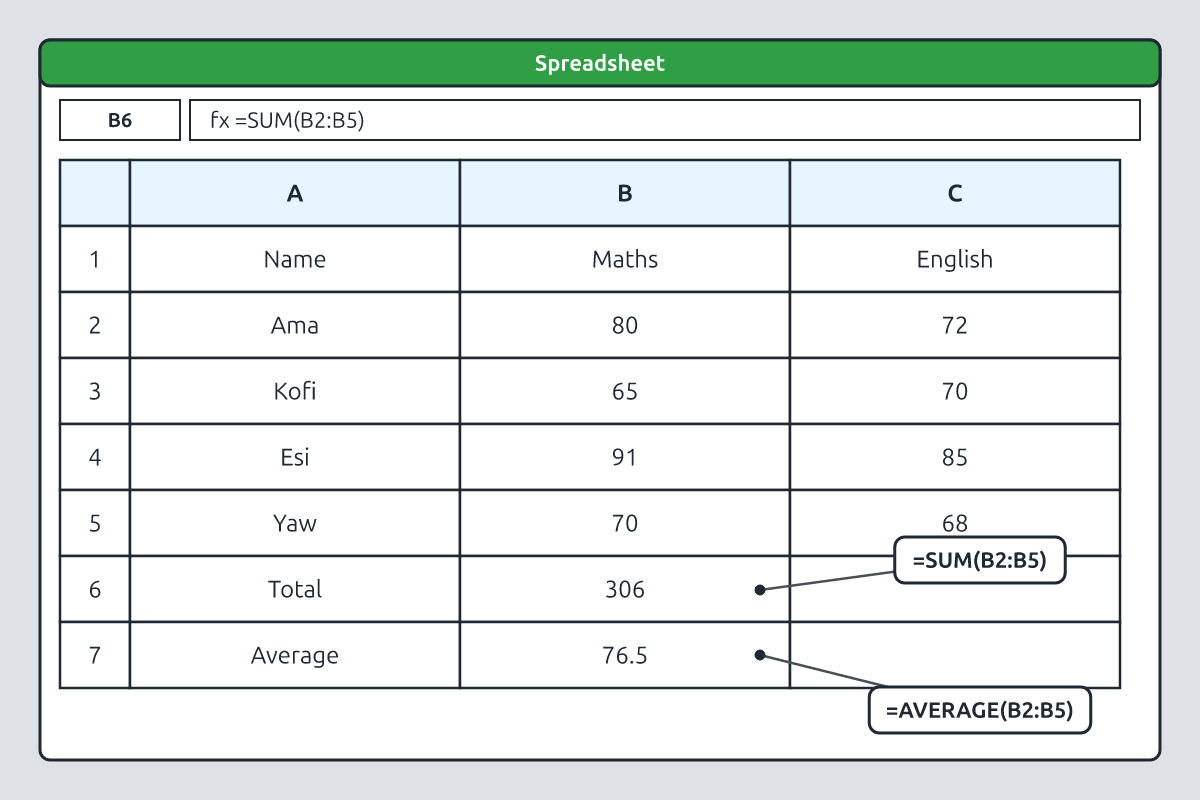
A spreadsheet program such as Microsoft Excel or Google Sheets organises data in a grid of rows (numbered 1, 2, 3…) and columns (lettered A, B, C…). Each box is a cell with an address, such as B3 (column B, row 3).
| A | B | C | |
|---|---|---|---|
| 1 | Name | Maths | English |
| 2 | Kofi | 72 | 65 |
| 3 | Ama | 85 | 90 |
| 4 | Yaw | 58 | 70 |
| 5 | Esi | 91 | 84 |
2. Sorting and Filtering
Sorting arranges data in order. Select the data, then click Data → Sort, choose the column (e.g. Maths) and the order (largest to smallest). Filtering shows only the rows that meet a condition. Click Data → Filter, then use the drop-down arrow on a column to show, for example, only scores above 70.
3. Simple Formulas
| Formula | What it does | Example result |
|---|---|---|
| =SUM(B2:B5) | adds all values from B2 to B5 | 306 |
| =AVERAGE(B2:B5) | finds the mean | 76.5 |
| =MAX(B2:B5) | finds the largest value | 91 |
| =MIN(B2:B5) | finds the smallest value | 58 |
| =B2+C2 | adds two cells | 137 (Kofi's total) |
4. Why Use a Spreadsheet?
Every formula begins with an equals sign (=). If you change a score, the totals and averages update automatically. This saves time and reduces mistakes, which is why spreadsheets are used by teachers, shops, banks and businesses.
Common mistake: Forgetting the = sign makes the computer treat the formula as ordinary text.
You can also copy a formula down a column by dragging the small square at the corner of the cell (the fill handle). The cell addresses change automatically for each row.
New words
- spreadsheet
- A program that arranges data in rows and columns.
- cell
- One box in a spreadsheet.
- cell address
- The column letter and row number of a cell, e.g. B3.
- formula
- An instruction that calculates a value.
- sort
- To arrange data in order.
- filter
- To show only data that meets a condition.
Summary
- Spreadsheets organise data in cells with addresses.
- Sorting orders data; filtering shows selected rows.
- SUM, AVERAGE, MAX and MIN calculate results.
- Formulas start with = and update automatically.
Class activity: Class Score Sheet
- Enter the sample data into a spreadsheet.
- Sort by Maths scores from highest to lowest.
- Use SUM, AVERAGE and MAX for each subject.
You need: Desktop computer, Keyboard, Mouse
Exercises
Answer in your exercise book first, then check your answers.
1. Every formula starts with…
- A. =
- B. +
- C. #
- D. @
Show answer
Answer: =The equals sign.2. Which formula finds the mean?
- A. =AVERAGE()
- B. =SUM()
- C. =MAX()
- D. =MIN()
Show answer
Answer: =AVERAGE()Mean value.3. Cell C4 is in column…
- A. C
- B. 4
- C. A
- D. B
Show answer
Answer: CColumn letter first.4. Sorting can arrange scores from highest to lowest.
- A. True
- B. False
Show answer
Answer: TrueDescending order.5. Filtering permanently deletes rows.
- A. True
- B. False
Show answer
Answer: FalseIt only hides them.6. One box in a spreadsheet is called a ______.
Show answer
Answer: cellHas an address.7. Write a formula to add the Maths scores in cells B2 to B5.
Show answer
Answer: =SUM(B2:B5)Range of cells.8. Why are spreadsheets useful for a teacher's records?
Show answer
Answer: They calculate totals and averages quickly and update automatically when scores change, reducing errors.Speed and accuracy.
Homework
- Draw a spreadsheet of five family members' ages and write the formulas for the total and average.