Basic 6 · Computing · Data, Sources and Usage
Storing and Manipulating Data for Output
In this topic you will demonstrate how to store data safely and manipulate it to produce the required output.
By the end of these notes you should be able to:
- Save files with suitable names in suitable locations
- Explain storage devices and units of storage
- Manipulate stored data to produce reports and charts
What you already know
- Manipulating sample data
Copy everything that has a blue line on its left into your notebook. The other parts are for reading.
- Strand
- Introduction To Computers
- Sub-strand
- Data, Sources and Usage
- Indicator
- B6.1.3.1.10-11 – Demonstrate how to store data and manipulate data to gain required output
Introduction
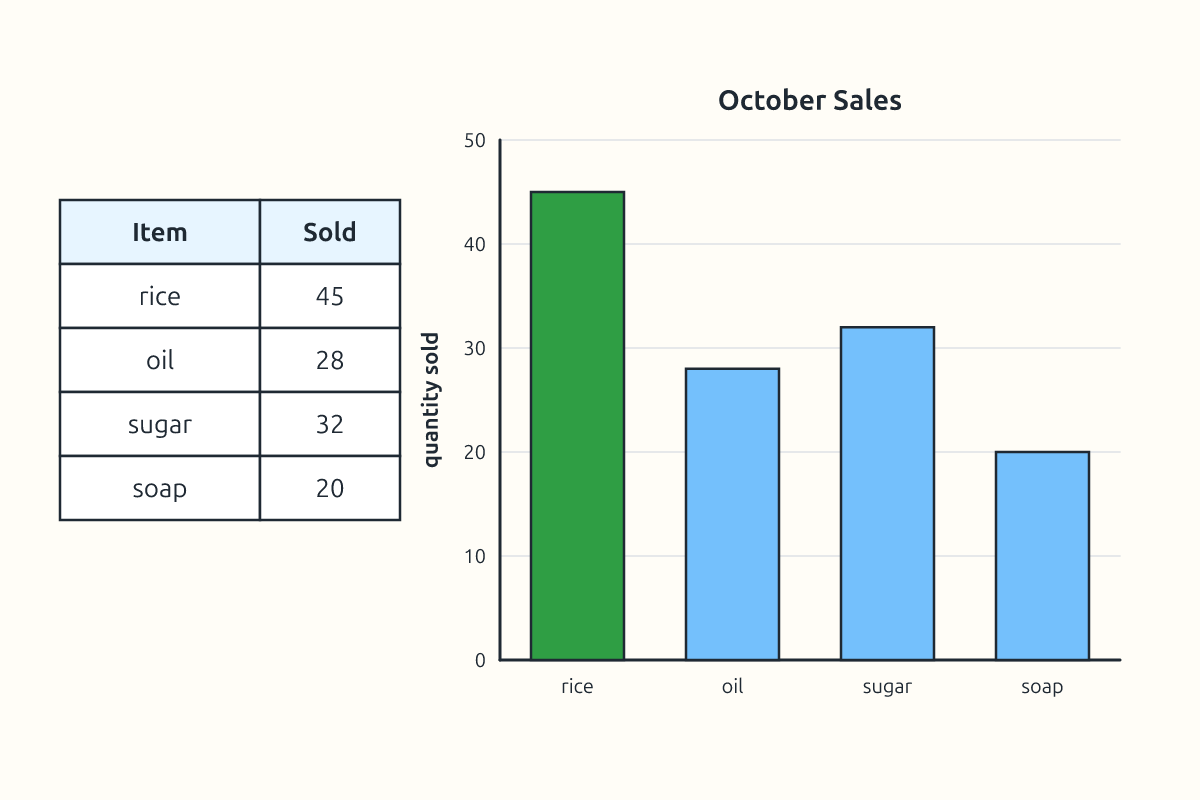
A shop owner records every sale on a computer. At the end of the month, she wants a chart showing her best-selling items. This needs data to be stored safely and then processed to give the right output.
1. Storage Devices
| Device | Type | Typical use |
|---|---|---|
| hard disk drive (HDD) | inside the computer | storing programs and files |
| solid state drive (SSD) | inside the computer | faster storage |
| USB flash drive | portable | carrying files |
| memory card (SD card) | portable | phones and cameras |
| external hard drive | portable | backups |
| cloud storage | online | access from anywhere |
2. Units of Storage
| Unit | Approximate size | Example |
|---|---|---|
| byte (B) | one character | the letter "A" |
| kilobyte (KB) | about 1,000 bytes | a short text file |
| megabyte (MB) | about 1,000 KB | a photo or song |
| gigabyte (GB) | about 1,000 MB | a film; phone storage |
| terabyte (TB) | about 1,000 GB | a large hard drive |
3. Saving Data Properly
- Click File → Save As (or Ctrl + S for the first save).
- Choose a location, such as Documents → School → Science.
- Type a clear file name, e.g. "Sales_October_2026".
- Click Save.
- Save regularly while working, and keep a backup copy on another device.
4. Manipulating Data for Output
Stored data can be processed to give different outputs. In a spreadsheet, you can sort sales to find the best-selling item, use SUM to find total sales, and insert a chart (Insert → Chart) to show sales visually. The chart can then be printed or shared.
Tip: Follow the 3-2-1 backup idea: keep 3 copies of important files, on 2 different devices, with 1 kept away from home (for example in the cloud).
New words
- storage
- Keeping data for later use.
- backup
- An extra copy of data kept for safety.
- byte
- The basic unit of computer storage.
- gigabyte
- About one billion bytes.
- output
- The result produced by processing data.
- chart
- A diagram showing data visually.
Summary
- Data is stored on HDDs, SSDs, flash drives, memory cards and the cloud.
- Storage is measured in bytes, KB, MB, GB and TB.
- Save files with clear names in organised folders and keep backups.
- Process stored data with formulas and charts to produce output.
Class activity: Shop Records
- Enter a week's pretend sales for four items in a spreadsheet.
- Save the file with a clear name in a class folder.
- Find the total sales and insert a bar chart.
You need: Desktop computer, Keyboard, Mouse
Exercises
Answer in your exercise book first, then check your answers.
1. Which is a portable storage device?
- A. USB flash drive
- B. Monitor
- C. Keyboard
- D. CPU
Show answer
Answer: USB flash driveCarry it around.2. Which is the largest unit?
- A. Terabyte
- B. Gigabyte
- C. Megabyte
- D. Kilobyte
Show answer
Answer: TerabyteAbout 1,000 GB.3. An extra copy of data kept for safety is a…
- A. backup
- B. virus
- C. formula
- D. chart
Show answer
Answer: backupProtects against loss.4. A photo is usually measured in megabytes.
- A. True
- B. False
Show answer
Answer: TrueA few MB.5. You only need to save a document once, at the end.
- A. True
- B. False
Show answer
Answer: FalseSave regularly.6. One character takes about one ______ of storage.
Show answer
Answer: byteBasic unit.7. Give three tips for storing files safely.
Show answer
Answer: Use clear names, organise folders, keep backups (or save regularly).Any three.8. How can a shop owner use stored sales data to make a decision?
Show answer
Answer: Sort and chart the data to find best-selling items, then buy more of those items.Data for decisions.
Homework
- Check the storage size of a phone or computer at home and how much is used.