Basic 5 · Computing · Generation of Computers
Keyboard Rows and the Numeric Keypad
In this topic you will identify the home row, top row, bottom row and numeric keypad and use the correct fingers.
By the end of these notes you should be able to:
- Identify the home, top and bottom row keys
- Place the fingers correctly on the home row
- Use the numeric keypad to enter numbers
What you already know
- Mousing and keyboarding skills
Copy everything that has a blue line on its left into your notebook. The other parts are for reading.
- Strand
- Introduction To Computing
- Sub-strand
- Generation of Computers
- Indicator
- B5.1.1.1.5-7 – Identify home row keys top row, bottom row keys numerical pad
Introduction
Typists can type fast without looking at the keyboard. The secret is keeping the fingers on the home row and knowing which finger presses each key.
1. The Letter Rows
| Row | Letter keys |
|---|---|
| top row | Q W E R T Y U I O P |
| home row | A S D F G H J K L ; |
| bottom row | Z X C V B N M , . / |
The keyboard is called QWERTY because the first six letters of the top row are Q, W, E, R, T and Y. Above the top row is the number row with 1 to 0 and symbols.
2. Home Row Position
Place the left-hand fingers on A, S, D and F, and the right-hand fingers on J, K, L and ;. Both thumbs rest on the Space bar. The F and J keys have small bumps so you can find them without looking. From the home row, each finger reaches up to the top row and down to the bottom row, then returns home.
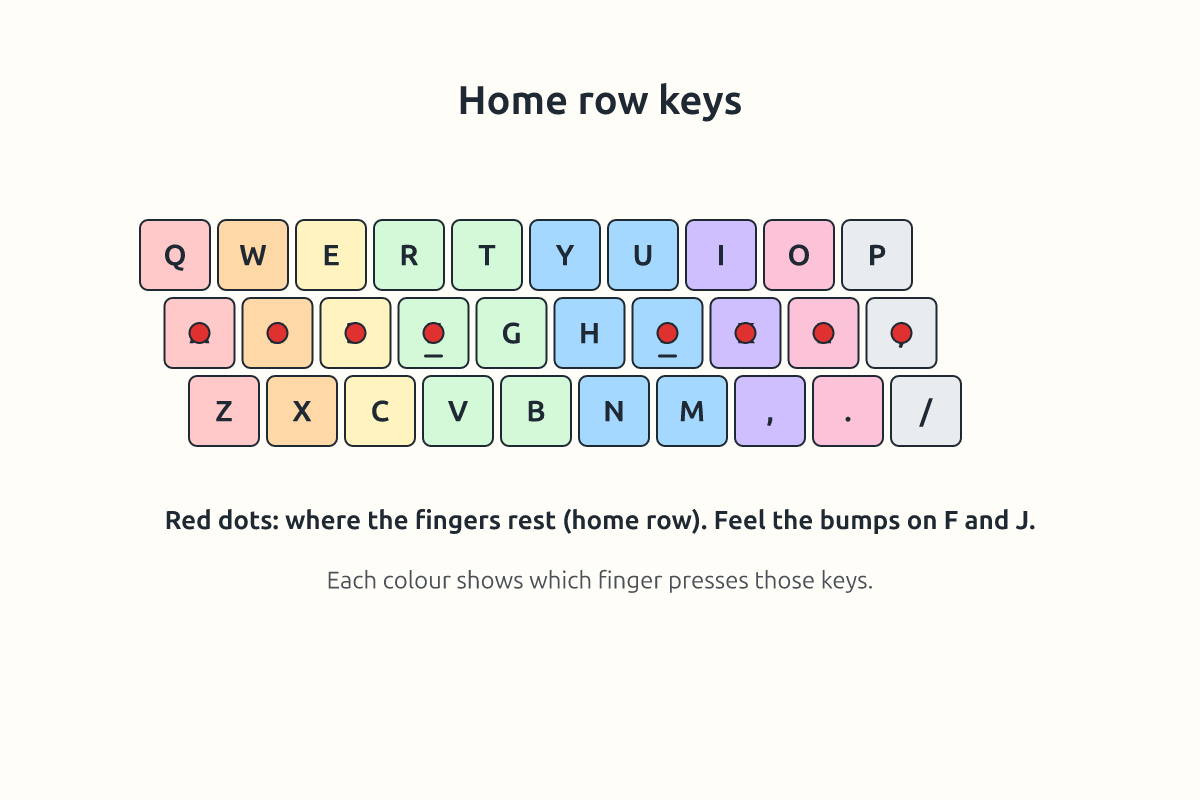
| Finger | Left hand | Right hand |
|---|---|---|
| little finger | Q A Z | P ; / |
| ring finger | W S X | O L . |
| middle finger | E D C | I K , |
| index finger | R T F G V B | Y U H J N M |
3. The Numeric Keypad
On the right side of most desktop keyboards is the numeric keypad. It is arranged like a calculator with the digits 0 to 9, a decimal point and the signs +, −, * (multiply) and / (divide). It also has its own Enter key. Press Num Lock to switch the keypad on. When Num Lock is off, the keys work as arrow keys and other movement keys.
The 5 key has a bump, like F and J. Rest the right index finger on 4, the middle finger on 5 and the ring finger on 6. Use the thumb for 0. This is how bank and shop workers enter numbers quickly.
Tip: Practise "asdf jkl;" until your fingers can find the home row without looking.
New words
- home row
- The middle row of letter keys where the fingers rest.
- top row
- The row of letter keys above the home row.
- bottom row
- The row of letter keys below the home row.
- numeric keypad
- The block of number keys on the right.
- Num Lock
- The key that switches the numeric keypad on and off.
- QWERTY
- The common keyboard layout named after its first six letters.
Summary
- The letter keys are in the top, home and bottom rows.
- Fingers rest on ASDF and JKL; with thumbs on the Space bar.
- F and J have bumps to guide the fingers.
- The numeric keypad works when Num Lock is on.
Class activity: Row Typing
- Type "asdf jkl;" five times without looking.
- Type "qwert yuiop" and "zxcvb nm,./".
- Use the numeric keypad to type the numbers 1 to 20.
You need: Desktop computer, Keyboard, Mouse
Exercises
Answer in your exercise book first, then check your answers.
1. Which keys are on the home row?
- A. A S D F
- B. Q W E R
- C. Z X C V
- D. 1 2 3 4
Show answer
Answer: A S D FThe left hand rests on them.2. Which keys have bumps?
- A. F and J
- B. A and L
- C. Q and P
- D. Z and M
Show answer
Answer: F and JThey guide the index fingers.3. What must be on for the keypad to type numbers?
- A. Num Lock
- B. Caps Lock
- C. Scroll Lock
- D. Shift
Show answer
Answer: Num LockIt switches the keypad on.4. Q, W, E, R, T and Y are on the top row.
- A. True
- B. False
Show answer
Answer: TrueThey give QWERTY its name.5. The thumbs rest on the Enter key.
- A. True
- B. False
Show answer
Answer: FalseThey rest on the Space bar.6. The block of number keys on the right is the numeric ______.
Show answer
Answer: keypadIt works like a calculator.7. Name the four keys the right hand rests on.
Show answer
Answer: J, K, L and ;The home row.8. Why is it useful to type without looking at the keyboard?
Show answer
Answer: It is faster, more accurate, and you can watch the screen to spot mistakes.Touch typing.
Homework
- Draw the keyboard rows and colour the home row keys.