Basic 4 · Computing · Generation of Computers
Typing Short Phrases
In this topic you will learn how to sit correctly, place your fingers on the home row keys, use the right finger for each key and type short phrases.
By the end of these notes you should be able to:
- Sit correctly when typing
- Place fingers correctly on the home row keys
- Use the Shift, Spacebar, Enter and Backspace keys
- Type short phrases correctly
What you already know
- The keyboard as an input device
Copy everything that has a blue line on its left into your notebook. The other parts are for reading.
- Strand
- Introduction to Computing
- Sub-strand
- Generation of Computers
- Indicator
- B4.1.1.1.4 – Type short phrases
Introduction
Typing fast and correctly is a useful skill. Good typists use all ten fingers and do not look at the keyboard. In this lesson you will learn which finger presses which key and practise typing short phrases.
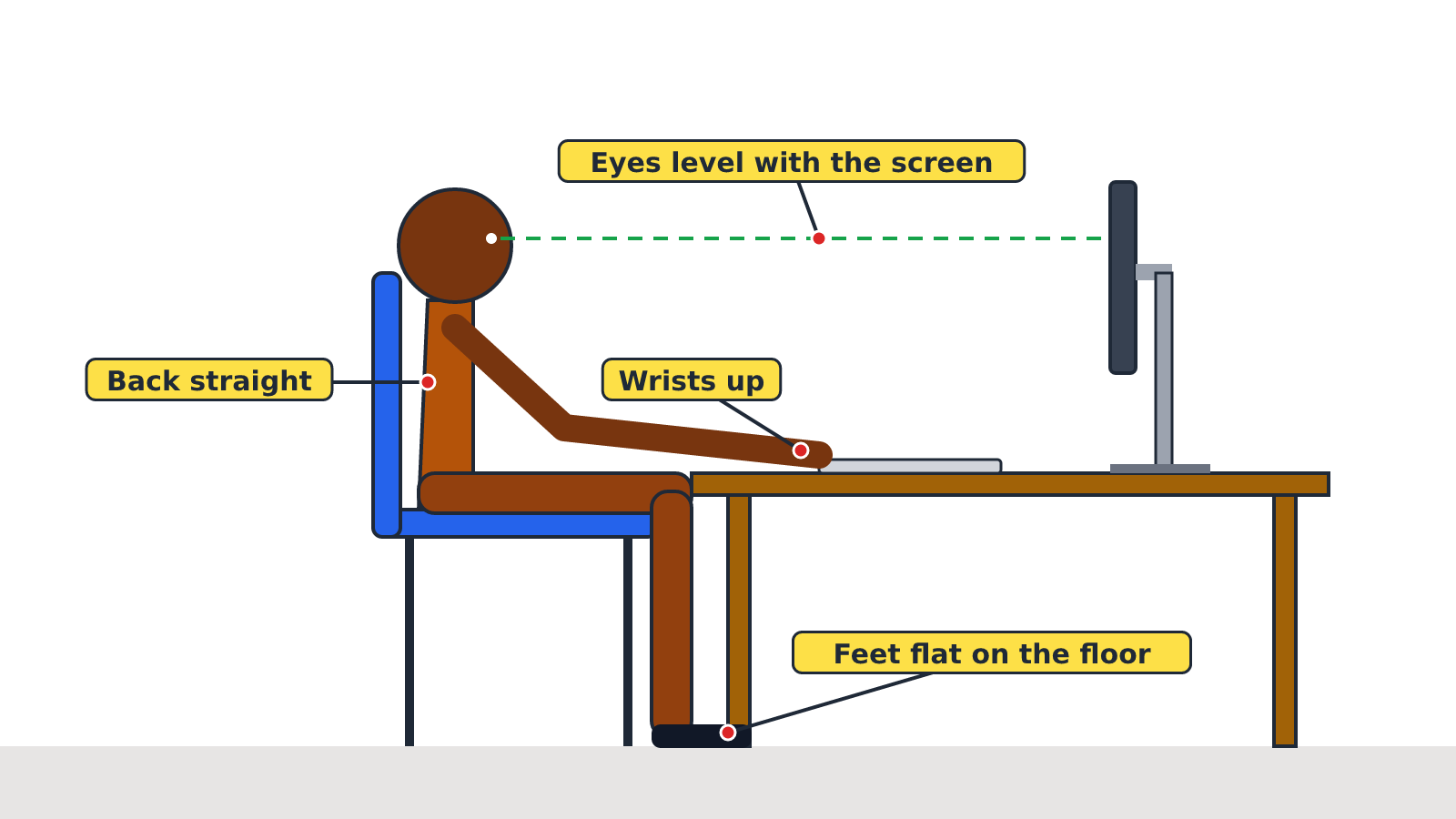
1. Sitting Correctly
- Sit up straight with your back against the chair.
- Keep both feet flat on the floor.
- Keep the monitor in front of you, at eye level.
- Keep your wrists up. Do not rest them on the keyboard.
- Curve your fingers gently over the keys.
2. The Home Row Keys
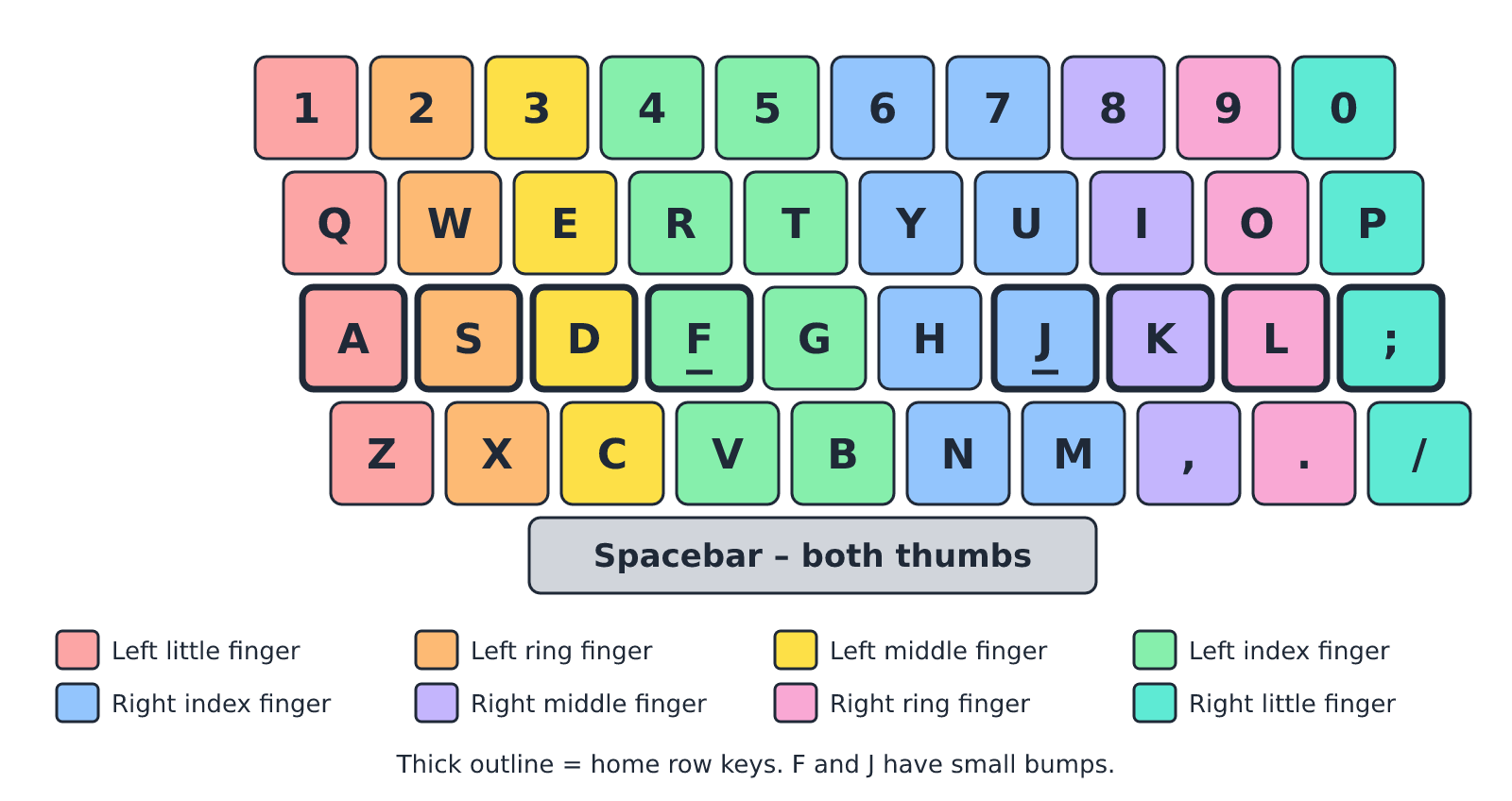
The home row is the middle row of letter keys. Your fingers rest here before and after pressing other keys.
| Hand | Little finger | Ring finger | Middle finger | Index finger |
|---|---|---|---|---|
| Left hand | A | S | D | F |
| Right hand | ; | L | K | J |
Both thumbs rest on the Spacebar.
Tip: The F and J keys have small bumps on them. Feel the bumps with your index fingers to find the home row without looking.
3. Which Finger Presses Which Key
| Finger | Left hand keys | Right hand keys |
|---|---|---|
| Little finger | Q, A, Z | P, ;, / |
| Ring finger | W, S, X | O, L, . |
| Middle finger | E, D, C | I, K, , |
| Index finger | R, F, V, T, G, B | Y, H, N, U, J, M |
| Thumb | Spacebar | Spacebar |
4. Special Keys for Typing Phrases
| Key | What it does |
|---|---|
| Spacebar | Puts a space between words |
| Shift | Hold it down and press a letter to type a capital letter |
| Enter | Moves the cursor to a new line |
| Backspace | Deletes the character to the left of the cursor |
| Caps Lock | Turns on capital letters for all letters until you press it again |
Remember: To type a capital letter, hold Shift with the little finger of the OTHER hand. For capital 'G' (left hand), hold the right Shift key.
5. Typing Short Phrases
Steps
- Click the Start button.
- Type WordPad (or Word) and press Enter to open the program.
- Place your fingers on the home row keys.
- Type each phrase below. Press Enter after each phrase.
- Check your work and use Backspace to correct mistakes.
Practice phrases
- Ghana is my country.
- I love my school.
- Kofi has a red ball.
- We learn Computing on Friday.
- Akosua and Yaw are friends.
New words
- Home row
- The middle row of letter keys where the fingers rest: A S D F J K L ;
- Cursor
- The blinking line that shows where the next letter will appear.
- Spacebar
- The longest key on the keyboard; it puts a space between words.
- Shift key
- A key held down to type capital letters and symbols.
- Backspace
- A key that deletes the character to the left of the cursor.
- Phrase
- A small group of words.
Summary
- Sit up straight, feet flat, wrists up when typing.
- Left hand home keys: A S D F. Right hand home keys: J K L ;
- Thumbs press the Spacebar.
- Use Shift for capital letters, Enter for a new line and Backspace to delete.
Class activity: Typing Practice
- Work in pairs at one computer. One learner types while the other checks the finger positions.
- Type the five practice phrases.
- Swap roles. Count how many phrases each of you typed without mistakes.
You need: Desktop computer, Mouse, Keyboard
Exercises
Answer in your exercise book first, then check your answers.
1. Which keys are the home row keys for the left hand?
- A. Q W E R
- B. A S D F
- C. Z X C V
- D. J K L ;
Show answer
Answer: A S D FThe left-hand fingers rest on A, S, D and F.2. Which finger presses the Spacebar?
- A. Little finger
- B. Index finger
- C. Thumb
- D. Ring finger
Show answer
Answer: ThumbBoth thumbs rest on the Spacebar.3. Which key deletes the letter to the left of the cursor?
- A. Enter
- B. Shift
- C. Backspace
- D. Caps Lock
Show answer
Answer: BackspaceBackspace removes the character before the cursor.4. The F and J keys have small bumps to help you find the home row.
- A. True
- B. False
Show answer
Answer: TrueThe bumps guide your index fingers.5. You should rest your wrists on the keyboard while typing.
- A. True
- B. False
Show answer
Answer: FalseKeep your wrists up for comfort and speed.6. The right index finger rests on the ______ key.
Show answer
Answer: JRight hand home keys are J, K, L and ; starting with the index finger.7. Explain how to type a capital letter 'K'.
Show answer
Answer: Hold down the left Shift key with the left little finger and press K with the right middle finger.K is pressed by the right hand, so the left Shift key is used.8. Write three rules for sitting correctly when typing.
Show answer
Answer: Any three: sit up straight; feet flat on the floor; monitor at eye level; wrists up; fingers curved.Any three correct rules are accepted.
Homework
- Draw the home row keys in your notebook and write the finger that presses each key.