Basic 4 · Computing · Generation of Computers
RAM and ROM
In this topic you will learn about the two types of main memory in a computer, RAM and ROM, and how they are different.
By the end of these notes you should be able to:
- State the full meaning of RAM and ROM
- Describe what RAM and ROM do
- State at least four differences between RAM and ROM
What you already know
- The system unit and storage devices
Copy everything that has a blue line on its left into your notebook. The other parts are for reading.
- Strand
- Introduction to Computing
- Sub-strand
- Generation of Computers
- Indicator
- B4.1.1.1.3 – Differentiate between RAM and ROM
Introduction
When your teacher writes on the chalkboard, the writing is wiped off at the end of the day. But the words printed in your textbook stay there forever. A computer has two kinds of memory that work in a similar way: RAM and ROM.
1. Computer Memory
Memory: The part of the computer that holds data and instructions.
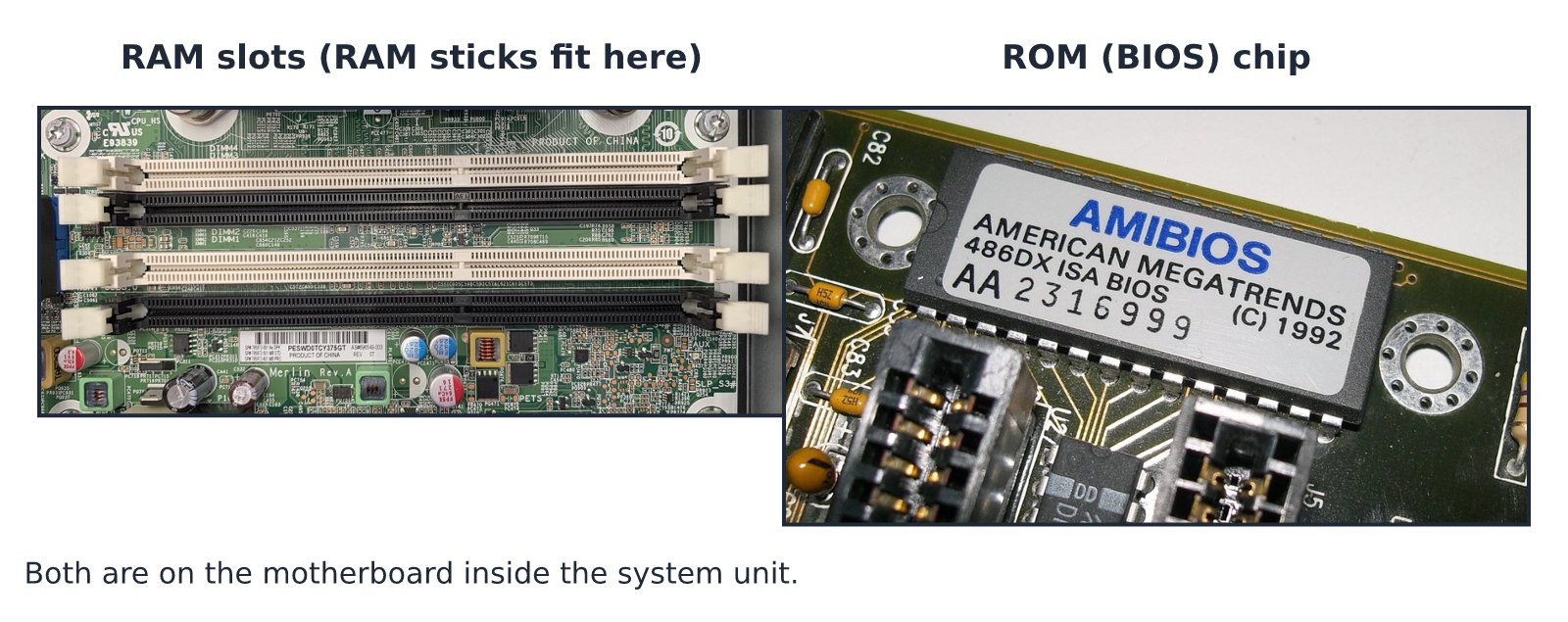
Memory chips are found on the motherboard inside the system unit. The motherboard is the main circuit board that connects all the parts of the computer.
2. RAM (Random Access Memory)
- RAM stores the programs and data that the computer is using at the moment.
- The processor can read from RAM and write to RAM very quickly.
- RAM is temporary memory. When the computer is switched off, everything in RAM is lost. That is why we must save our work.
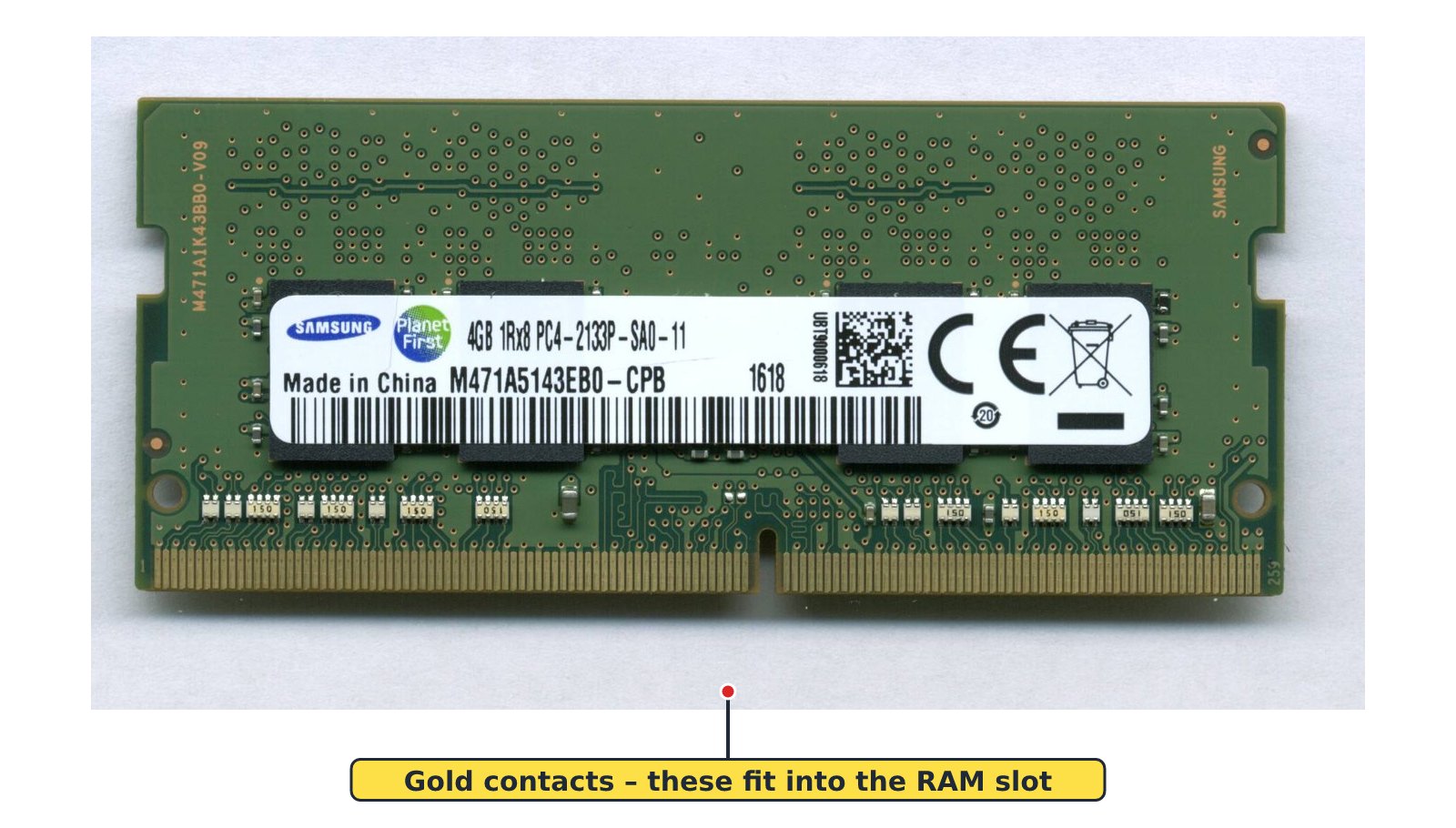
- RAM comes as a long, thin stick (module) that fits into a slot on the motherboard.
- The size of RAM is measured in gigabytes (GB), for example 4 GB or 8 GB. More RAM helps the computer to run more programs at the same time.
3. ROM (Read Only Memory)
- ROM stores instructions that were recorded on it by the maker of the computer.
- These instructions help the computer to start up when it is switched on. This is called booting.
- ROM is permanent memory. Its contents are NOT lost when the computer is switched off.
- Data in ROM can be read, but it cannot normally be changed. That is why it is called 'read only'.
- ROM is a small chip fixed on the motherboard.
4. Differences Between RAM and ROM
| RAM | ROM |
|---|---|
| Random Access Memory | Read Only Memory |
| Temporary – contents are lost when power goes off | Permanent – contents stay when power goes off |
| Can be read and written (changed) | Can only be read, not normally changed |
| Holds programs and data in use now | Holds start-up (booting) instructions |
| Usually larger in size, e.g. 4 GB, 8 GB | Small in size |
| A stick that can be removed and changed | A chip fixed on the motherboard |
Remember: RAM is like the chalkboard – it is wiped. ROM is like the printed textbook – it stays.
Common mistake: RAM is not the same as the hard disk. The hard disk keeps your files even when the computer is off. RAM only holds what is being used now.
New words
- RAM
- Random Access Memory; temporary memory that holds programs and data in use.
- ROM
- Read Only Memory; permanent memory that holds start-up instructions.
- Motherboard
- The main circuit board inside the system unit that connects all the parts.
- Booting
- The process of starting up a computer.
- Temporary
- Lasting only for a short time.
- Permanent
- Lasting for a long time; not lost.
Summary
- RAM means Random Access Memory; ROM means Read Only Memory.
- RAM is temporary – its contents are lost when the computer is switched off.
- ROM is permanent – it keeps the start-up (booting) instructions.
- RAM can be read and changed; ROM can only be read.
Class activity: Spot the Memory
- Look at the RAM module and the photographs of ROM chips your teacher shows you.
- Hold the RAM module carefully by its edges. Do not touch the gold contacts.
- In your exercise book, draw a two-column table and write three facts about RAM and three about ROM.
You need: Discarded RAM module, Printed labelled photographs of ROM chips, Exercise books
Exercises
Answer in your exercise book first, then check your answers.
1. RAM stands for…
- A. Read Access Memory
- B. Random Access Memory
- C. Random Area Memory
- D. Read And Memory
Show answer
Answer: Random Access MemoryR-A-M: Random Access Memory.2. ROM stands for…
- A. Read Only Memory
- B. Random Only Memory
- C. Read Open Memory
- D. Run Only Memory
Show answer
Answer: Read Only MemoryR-O-M: Read Only Memory.3. Which memory loses its contents when the computer is switched off?
- A. ROM
- B. Hard disk
- C. RAM
- D. Flash drive
Show answer
Answer: RAMRAM is temporary memory.4. ROM holds the instructions that help the computer to start up.
- A. True
- B. False
Show answer
Answer: TrueROM keeps the booting instructions.5. Data in ROM can easily be changed by the user.
- A. True
- B. False
Show answer
Answer: FalseROM can only be read; it cannot normally be changed.6. The process of starting up a computer is called ______.
Show answer
Answer: bootingSwitching on and starting up the computer is booting.7. State three differences between RAM and ROM.
Show answer
Answer: Any three: RAM is temporary, ROM is permanent; RAM can be read and written, ROM can only be read; RAM holds programs in use, ROM holds start-up instructions; RAM is larger, ROM is small.Each difference must compare RAM with ROM.8. Yaw was typing a story when the light went off. When the light came back, his story was gone. Explain why.
Show answer
Answer: His story was only in RAM and he had not saved it. RAM loses its contents when power goes off.Work must be saved to a storage device such as the hard disk to keep it.
Homework
- Copy the table 'RAM and ROM compared' into your notebook and learn it.