Basic 4 · Computing · Generation of Computers
Input Devices and Their Uses
In this topic you will learn about the devices we use to enter data into a computer, such as the keyboard, mouse, scanner and microphone, and what each one is used for.
By the end of these notes you should be able to:
- Explain what an input device is
- Name at least six input devices
- State the use of each input device
- Identify the parts of a mouse
What you already know
- The keyboard and mouse as main parts of a computer
- Output devices
Copy everything that has a blue line on its left into your notebook. The other parts are for reading.
- Strand
- Introduction to Computing
- Sub-strand
- Generation of Computers
- Indicator
- B4.1.1.1.2 – Describe the types of input devices of a computer and their uses
Introduction
Before a computer can do any work, we must give it data. We type on the keyboard, click with the mouse or speak into a microphone. The devices we use to do this are called input devices.
1. What is an Input Device?
Input device: A hardware device used to enter (feed) data and instructions into the computer.
Remember: INPUT goes IN to the computer. OUTPUT comes OUT of the computer.
2. Types of Input Devices and Their Uses
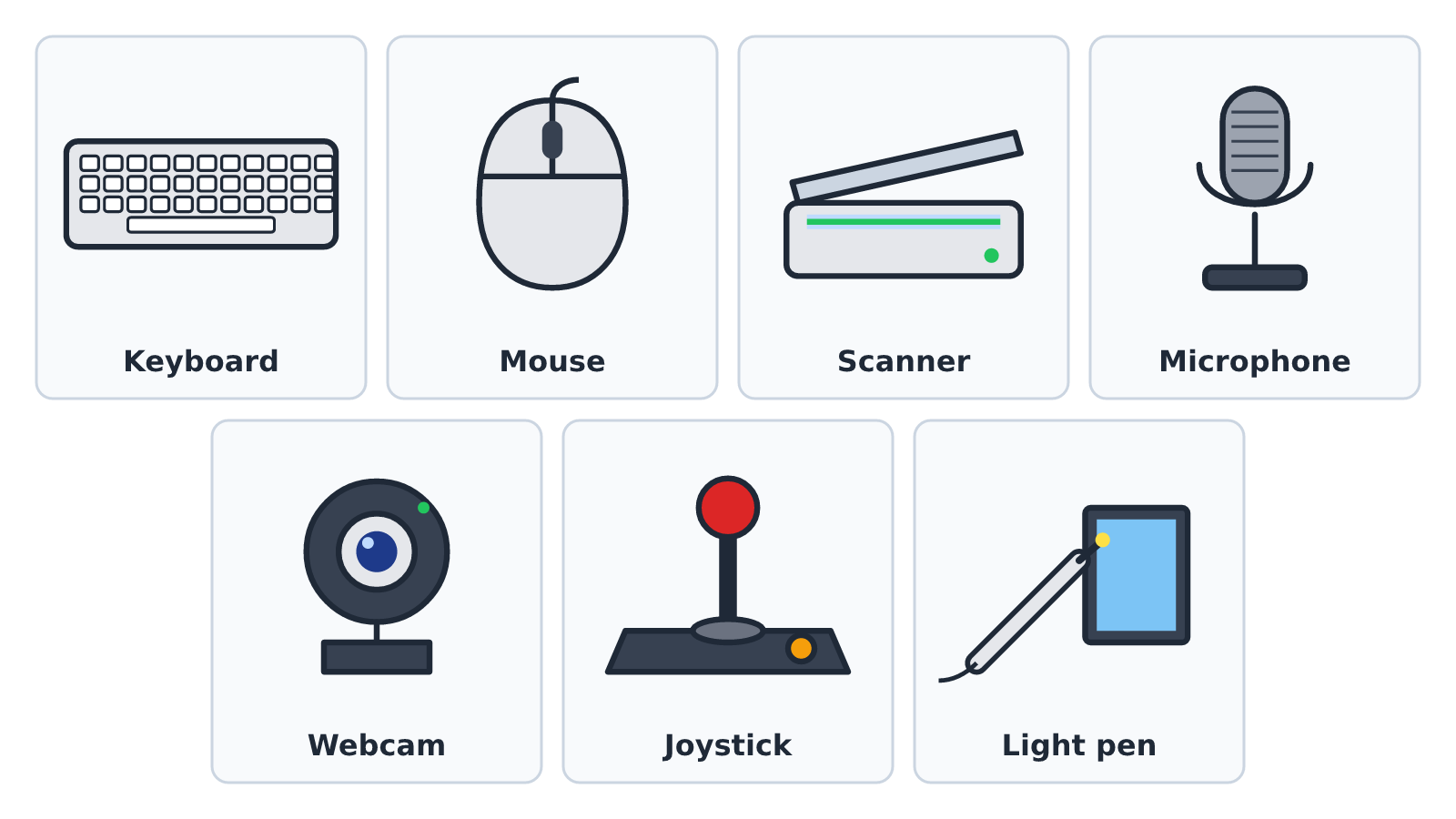
| Input device | Use |
|---|---|
| Keyboard | Typing letters, numbers and symbols |
| Mouse | Pointing, clicking, selecting and dragging items on the screen |
| Touchpad | Used on laptops instead of a mouse; you move your finger on it |
| Touch screen | Giving instructions by touching the screen, e.g. on phones and tablets |
| Scanner | Copying pictures and documents from paper into the computer |
| Microphone | Entering sound and voice into the computer |
| Webcam | Capturing pictures and video for video calls |
| Joystick | Controlling movement in computer games |
| Light pen | Drawing or selecting items directly on the screen |
| Pointing stick | A small button in the middle of some laptop keyboards, used to move the pointer |
3. Parts of the Mouse
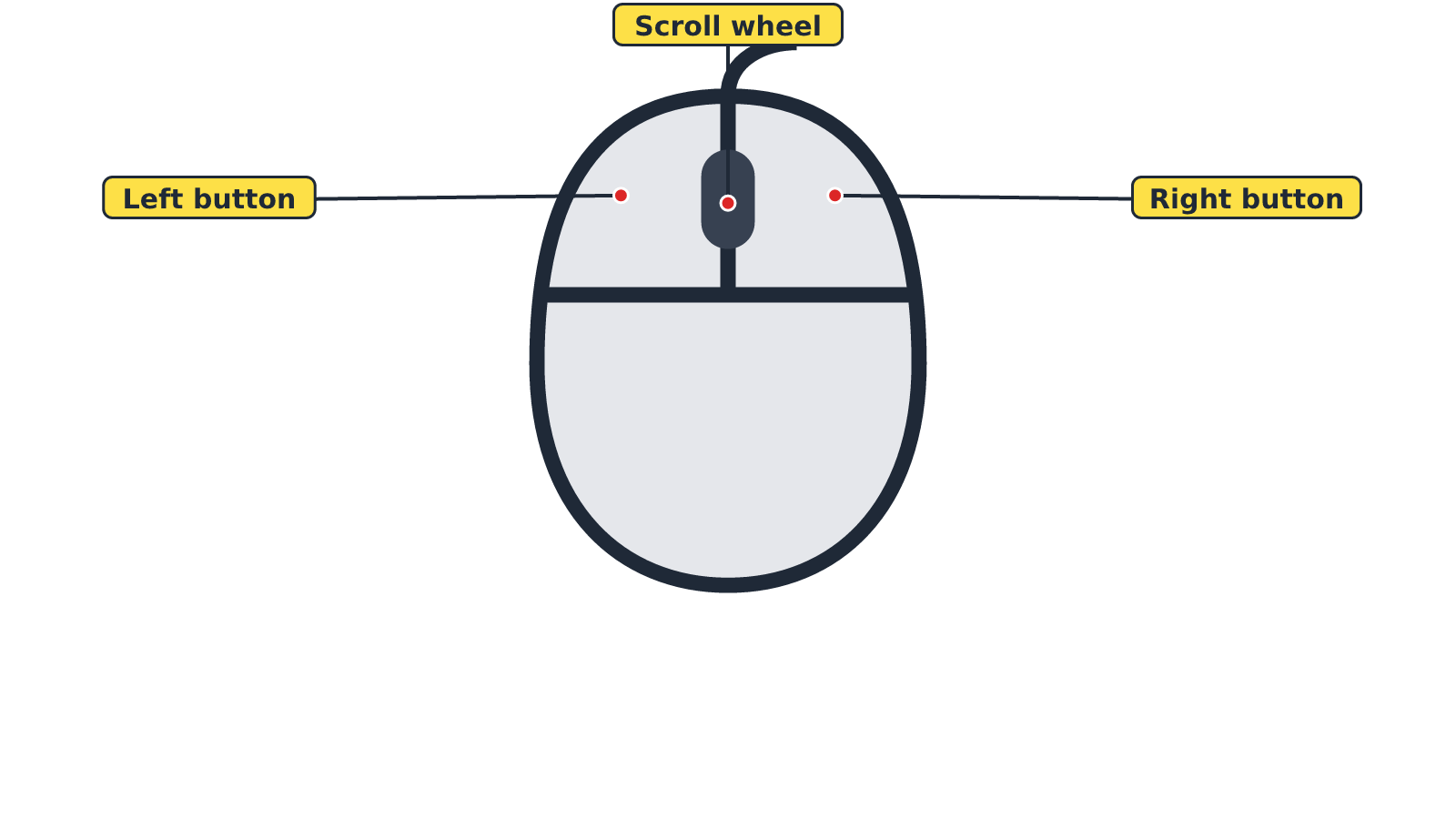
Most computer mice have three parts that we use:
- Left button – used to select and open items. Pressing it once is called a click; pressing it twice quickly is called a double-click.
- Right button – opens a short menu of options (right-click).
- Scroll wheel – used to move up and down a page.
Tip: Hold the mouse gently with your palm resting on it. Use your index finger for the left button and your middle finger for the right button.
New words
- Input device
- A hardware device used to enter data and instructions into the computer.
- Scanner
- A device that copies pictures and documents from paper into the computer.
- Webcam
- A small camera used to capture pictures and video for the computer.
- Joystick
- A stick-shaped device used to control movement in games.
- Click
- Pressing and releasing the left mouse button once.
- Double-click
- Pressing the left mouse button twice quickly.
Summary
- Input devices are used to enter data and instructions into the computer.
- Examples: keyboard, mouse, touchpad, touch screen, scanner, microphone, webcam, joystick and light pen.
- The mouse has a left button, a right button and a scroll wheel.
- Input goes in; output comes out.
Class activity: Input Devices Ball Game
- Stand in a circle. Your teacher throws a ball to one learner.
- The learner who catches it names an input device and says its use.
- That learner throws the ball to another learner. Do not repeat a device already named.
You need: A soft ball, Desktop computer set, Detached keyboard and mouse
Exercises
Answer in your exercise book first, then check your answers.
1. Which of these is an input device?
- A. Printer
- B. Monitor
- C. Keyboard
- D. Speaker
Show answer
Answer: KeyboardThe keyboard is used to enter letters and numbers into the computer.2. Which device is used to copy a picture from paper into the computer?
- A. Scanner
- B. Projector
- C. Headphones
- D. Printer
Show answer
Answer: ScannerA scanner copies documents and pictures into the computer.3. Which input device is mostly used for playing computer games?
- A. Light pen
- B. Joystick
- C. Microphone
- D. Scanner
Show answer
Answer: JoystickA joystick controls movement in games.4. A microphone is used to enter sound into the computer.
- A. True
- B. False
Show answer
Answer: TrueA microphone picks up voice and sound.5. Pressing the left mouse button twice quickly is called a right-click.
- A. True
- B. False
Show answer
Answer: FalseIt is called a double-click.6. The part of the mouse used to move up and down a page is the ______.
Show answer
Answer: scroll wheelRolling the scroll wheel moves the page up or down.7. Name four input devices and state the use of each.
Show answer
Answer: Any four, e.g. keyboard – typing; mouse – pointing and clicking; webcam – capturing video; microphone – entering sound.Any correct device with its matching use is accepted.8. Esi wants to talk to her uncle in London on a video call using a computer. Name two input devices she needs.
Show answer
Answer: A webcam and a microphone.The webcam captures her picture and the microphone captures her voice.
Homework
- List all the input devices you can find at home (on phones, TVs, computers). Write the use of each.