Basic 6 · Computing · Word Processing
Command Buttons in Microsoft Word
In this topic you will demonstrate how to use the menu bar (ribbon tabs) and command buttons in Microsoft Word to create and format documents.
By the end of these notes you should be able to:
- Identify the tabs and groups on the Word ribbon
- Use common command buttons to format text
- Create, save and print a simple document
What you already know
- PowerPoint text tools
Copy everything that has a blue line on its left into your notebook. The other parts are for reading.
- Strand
- Introduction To Word Processing
- Sub-strand
- Word Processing
- Indicator
- B6.3.1.1.1-3 – Demonstrate how to use the menu bar command buttons
Introduction
Microsoft Word is a word processing program for typing letters, reports and notes. Its ribbon contains command buttons that make formatting quick and easy.
1. The Word Window
| Part | Use |
|---|---|
| title bar | shows the document name |
| Quick Access Toolbar | Save, Undo and Redo buttons |
| ribbon tabs | File, Home, Insert, Layout, References, Review, View |
| document area | where you type |
| rulers | show margins and tabs |
| status bar | shows page number and word count |
2. Main Ribbon Tabs
| Tab | Common commands |
|---|---|
| File | New, Open, Save, Save As, Print, Close |
| Home | font, font size, bold, italic, underline, alignment, bullets, copy, paste |
| Insert | pictures, tables, shapes, page numbers, header and footer |
| Layout | margins, orientation (portrait/landscape), page size |
| Review | spelling and grammar, word count |
| View | zoom, print layout, read mode |
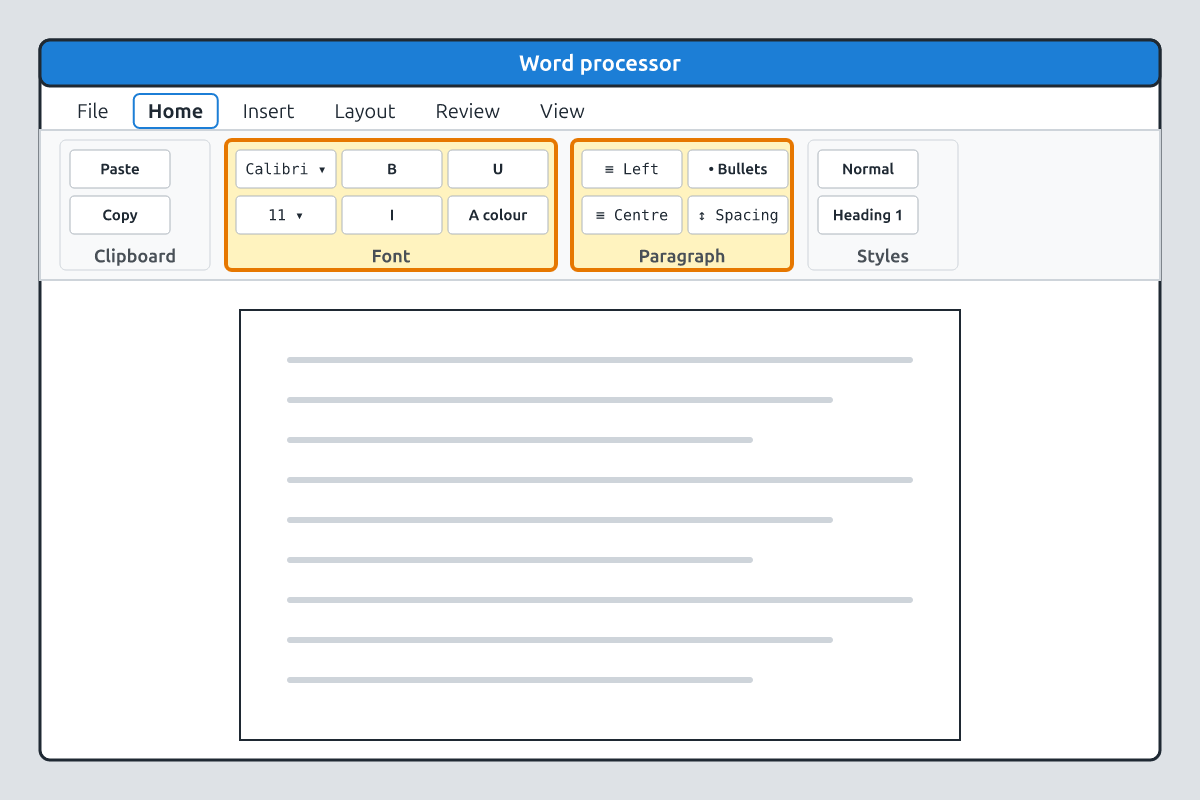
3. Formatting Commands
| Button | Shortcut | Effect |
|---|---|---|
| Bold (B) | Ctrl + B | makes text thick |
| Italic (I) | Ctrl + I | slants text |
| Underline (U) | Ctrl + U | underlines text |
| Align Left / Centre / Right / Justify | Ctrl + L / E / R / J | positions text |
| Bullets and Numbering | — | makes lists |
| Font Colour | — | changes text colour |
| Spelling & Grammar | F7 | checks spelling |
4. Creating a Document
- Open Word and choose Blank document.
- Type a short letter or report.
- Select the title, make it bold, larger and centred.
- Use bullets for a list.
- Press F7 to check spelling.
- Save with Ctrl + S and a clear file name.
- Print with Ctrl + P, choosing the printer and number of copies.
Common mistake: Select the text first before clicking a formatting button, or the change will only apply to new text you type.
New words
- word processor
- A program for creating text documents.
- ribbon
- The tabs and command buttons at the top of the window.
- command button
- A button that performs an action.
- format
- To change how text looks.
- alignment
- The position of text on the page.
- orientation
- Whether the page is portrait (upright) or landscape (sideways).
Summary
- Word's ribbon has tabs: File, Home, Insert, Layout, Review, View.
- The Home tab has font and paragraph formatting buttons.
- Select text before formatting it.
- Save with Ctrl + S and print with Ctrl + P.
Class activity: Format a Letter
- Type a short letter inviting parents to Speech Day.
- Format the heading (bold, centred, size 16) and use bullets for the programme.
- Check spelling, save and print preview your letter.
You need: Desktop computer, Mouse, Keyboard
Exercises
Answer in your exercise book first, then check your answers.
1. Which shortcut makes text bold?
- A. Ctrl + B
- B. Ctrl + I
- C. Ctrl + U
- D. Ctrl + P
Show answer
Answer: Ctrl + BB for bold.2. Margins and page orientation are on which tab?
- A. Layout
- B. Home
- C. Insert
- D. Review
Show answer
Answer: LayoutPage setup.3. F7 is used to…
- A. check spelling and grammar
- B. save
- C. print
- D. close
Show answer
Answer: check spelling and grammarReview command.4. The Home tab contains font formatting buttons.
- A. True
- B. False
Show answer
Answer: TrueFont and Paragraph groups.5. You can format text without selecting it first.
- A. True
- B. False
Show answer
Answer: FalseSelect existing text first.6. Ctrl + E ______ the text.
Show answer
Answer: centresCentre alignment.7. Name four tabs on the Word ribbon.
Show answer
Answer: File, Home, Insert, Layout (or Review, View).Any four.8. Explain the difference between portrait and landscape orientation.
Show answer
Answer: Portrait is upright (taller than wide); landscape is sideways (wider than tall).Page direction.
Homework
- Type and format a one-page report about your favourite subject.